
Learn how to search Georgia's eCorp database to look up a company, check a registered agent, or confirm a filing status.
Georgia's business search tool comes with a catch most people don't expect: the Secretary of State says outright that it's not a name availability check. Seeing no exact match doesn't mean a name is free to use. If you want an official answer, you need to reserve the name instead, which is covered in detail in this blog.
Let’s walk you through the eCorp search tool to help you understand what your results mean and how to reserve or register a name once you're ready to move forward.
Key Takeaways
Georgia's eCorp Business Search looks up entities by Business Name, Control Number, Registered Agent Name, and Officer Name, all from one portal.
The Secretary of State's own instructions state the tool "is not intended to serve as a name availability search." A name reservation is the only way to get an official answer. [1]
The Registered Agent Name search works in reverse, showing every entity a specific agent represents, useful for vetting a registered agent service before you sign up with them.
A name attached to a dissolved, withdrawn, or revoked entity isn't automatically free to reuse. Confirm through a name reservation first.
What Is the Georgia Business Entity Search
The Georgia business entity search, run through the Secretary of State's eCorp system, is a free, no-login database listing every corporation, LLC, limited partnership, limited liability partnership, and nonprofit registered in the state, along with its control number, entity type, status, principal office address, and registered agent. [1]
Georgia Business Entity Search at a Glance
Detail
Information
Search portal
Operated by
Georgia Secretary of State, Corporations Division
Cost to search
Free, no login required
The full fee breakdown for reservations, filings, and annual registration is in the cost section below.
How to Search for a Business Entity in Georgia
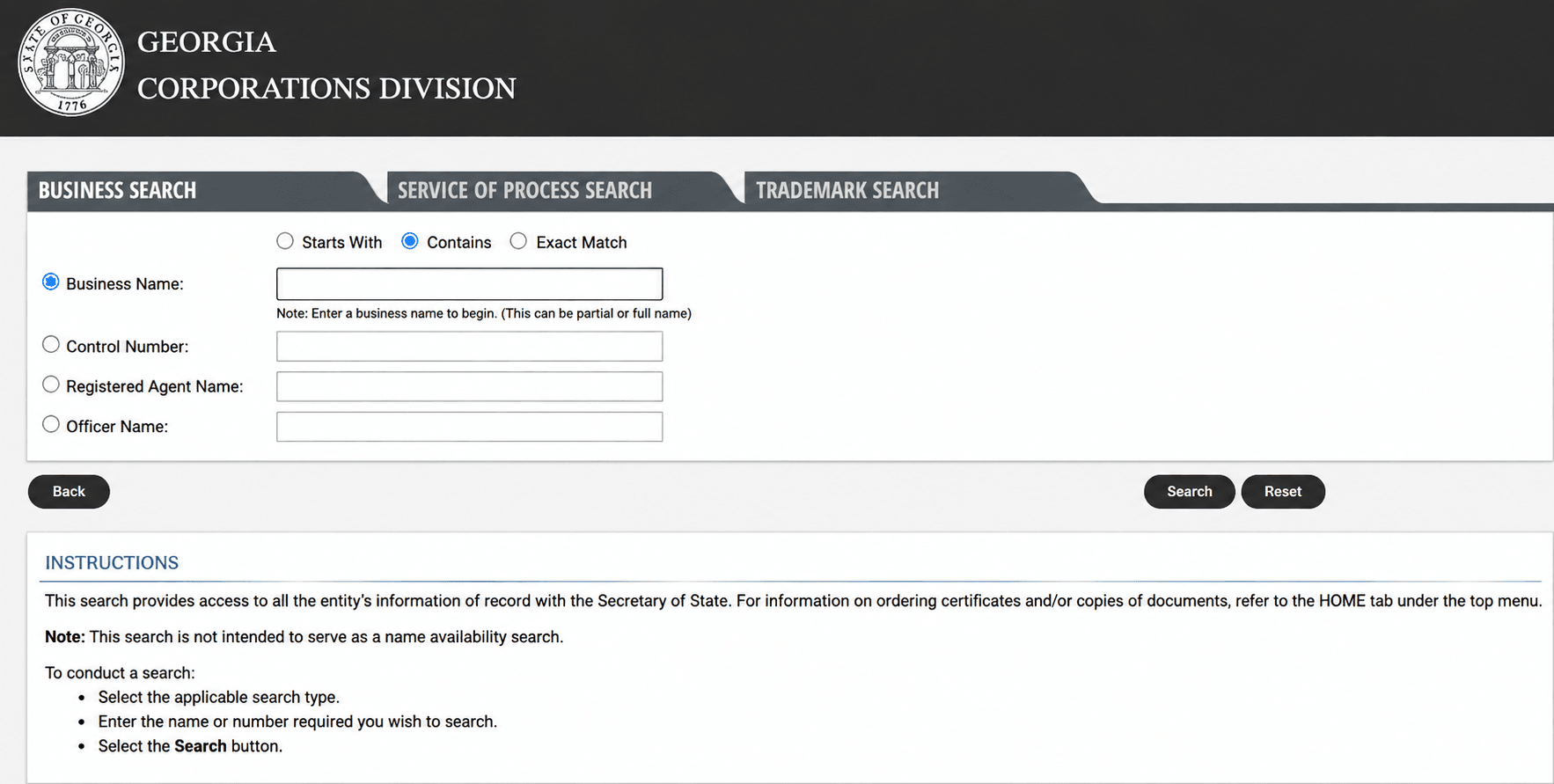
Step 1. Go to the Official eCorp Portal
Open the Secretary of State's Business Search. [1] No account or login is required.
Step 2. Choose Your Search Type
Select one of four radio-button options: Business Name, Control Number, Registered Agent Name, or Officer Name. Business Name is the default choice when you know or can guess the company's name; Registered Agent Name is useful for reverse lookups, such as confirming how many entities a specific agent represents.
Step 3. Enter Your Search Term and Match Type
Type the name, number, or agent into the search box, then choose how it should match: Starts With, Contains, or Exact Match. If you are not sure of the exact wording, start broad with Contains and narrow down from there. Because eCorp does not treat punctuation, spacing, or entity designators as distinguishing, searching your single most distinctive word is the surest way to catch look-alikes.
Step 4. Review Your Results
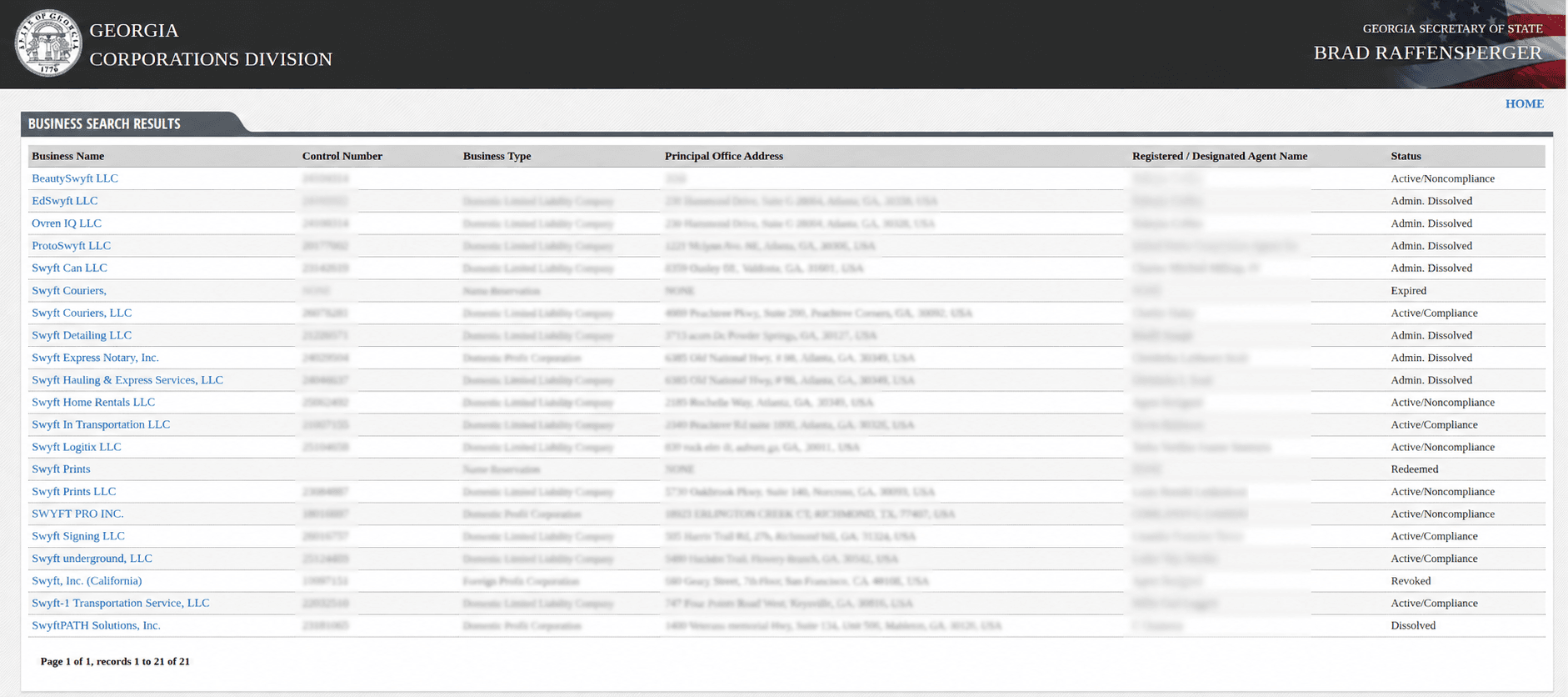
Results appear in a table showing the business name, control number, entity type, principal office address, registered agent, and current status. A newly filed entity can take a few business days to appear, so search again later if you expect a match and do not see one yet.
Step 5. Open the Full Entity Record
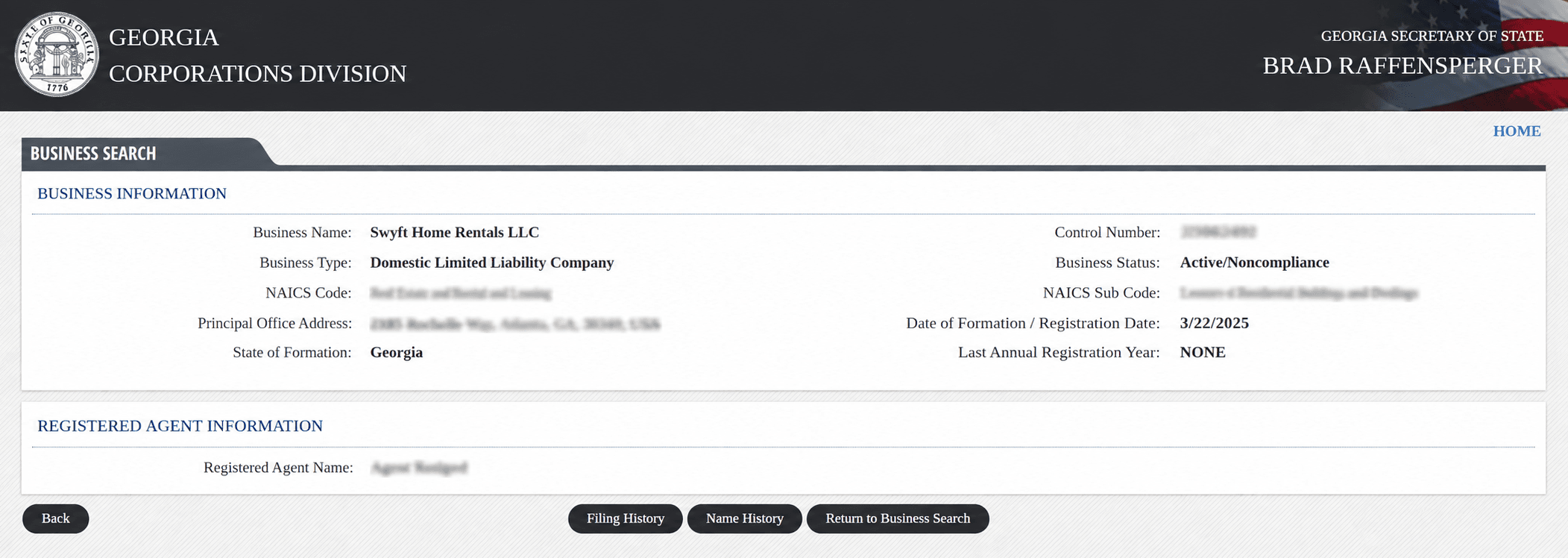
Click any result to open its detail page, including business purpose, jurisdiction, registered agent name and address, and the county of record.
How to Read Business Entity Search Results
What Information Is Public
- Legal entity name and control number
- Entity type and current status
- Jurisdiction, meaning whether the entity is domestic (Georgia) or foreign (formed elsewhere)
- Registered agent name and Georgia street address
- Principal office address and county
- Filing history, including access to most filed documents
What Information Is Not Public
- A federal Employer Identification Number (see the next section)
- Beneficial owners or the full ownership structure
- Financial information such as revenue or assets
- LLC members, managers, shareholders, and beneficial owners
What Does Entity Status Mean
Status | What It Means |
Active/Compliance | The entity is active and compliant with the applicable Secretary of State filing and annual-registration requirements. |
Active/Noncompliance | Still registered, but behind on a requirement such as annual registration; not fully in good standing |
Admin Dissolved | State dissolved the entity for unfiled annual registrations or unpaid fees |
Dissolved | Owners voluntarily closed the entity themselves |
Withdrawn | A foreign entity formally ended its authority to do business in Georgia |
Revoked | The Secretary of State revoked the entity's authority to transact business |
Dissolved, withdrawn, and revoked entities generally remain in the search results with that status shown, so their filing history stays visible even after they stop operating. A name attached to one of these is not automatically free to reuse; confirm through a name reservation before relying on it.
How to Use the Search to Vet a Business
If you are running the search to check out a company before you deal with it, a few patterns are worth a closer look:
- A status other than Active/Compliance, such as Active/Noncompliance, Admin Dissolved, Revoked, or Withdrawn, on a business presenting itself as fully operational.
- A very recent formation date on a company that claims a long track record.
- Several unrelated entities sharing one registered agent and address, which is often an ordinary registered-agent arrangement but occasionally warrants a closer look.
- A registered agent who has resigned, or an agent address that is only a mail drop.
Other Searches to Run Before You File
An eCorp match, or the lack of one, is only part of clearing a name. Before you commit, it is worth running a few checks the state database does not cover:
- Federal trademark: Search the USPTO database to make sure your name does not conflict with a registered mark, which carries nationwide rights the state search will not surface.
- Georgia state trademark: The Secretary of State registers state trademarks and service marks separately from entity names, so search those too if branding matters to you.
- Domain and social handles: Confirm a matching website domain and the social usernames you want are free before you settle on a name.
- UCC liens: To see whether a business has liens filed against it, search UCC records through the Georgia Superior Court Clerks' Cooperative Authority (GSCCCA), which is separate from eCorp.
Checking Name Availability and Reserving Your Name in Georgia
Georgia's Business Search tool is not a name availability check. If you want an official read on whether your name will hold up, a name reservation is the only way to get one.
If you have not settled on a name yet, Swyft Filings' free business name generator is a useful starting point before you reserve anything with the state.
How to Reserve Online
- Create an account through the Secretary of State's eCorp portal.
- Select "Name Reservation" and list your names in order of preference. The state only reviews your first choice if it is available, so put your top pick first.
- The total cost is $35. That breaks down to a $25 filing fee plus a $10 service charge, and the service charge is nonrefundable even if your name gets rejected.
- Wait for processing because online requests typically process in about 7 business days.
How to Reserve by Mail
Mail a completed name reservation request with a $35 check or money order (the same $25 filing fee plus $10 service charge) to
The Secretary of State,
Corporations Division, 2
Martin Luther King Jr. Dr. SE,
Suite 313 West Tower, Atlanta, GA 30334.
Mailed requests typically take about 15 business days to process.
What a Reservation Does and Does Not Protect
- Hold the name for 30 days and cannot be renewed; you must reapply and pay again if you need more time.
- Does not itself form your business. You still need to file Articles of Incorporation or Organization before the reservation expires; see our full walkthrough of forming an LLC in Georgia if that is the entity type you are filing.
- Does not protect against a federal trademark conflict. Check tmsearch.uspto.gov separately.
A reservation is not a green light to start signing contracts, running ads, or ordering a corporate seal under the new name. Wait until your entity is actually formed before relying on it for anything beyond holding the name.
Georgia Business Name Conventions
Your name can clear the Business Search and still get rejected at filing if it breaks one of Georgia's naming rules. Here is what to check before you reserve or file.
Naming Rules
- An LLC name must contain "limited liability company," "limited company," or an abbreviation such as LLC, L.L.C., LC, or L.C.
- A corporation name must contain "corporation," "incorporated," "company," or "limited," or an abbreviation such as Corp., Inc., Co., or Ltd. Corporations that later want pass-through tax treatment can look at our guide to electing S Corp status in Georgia, which does not change the entity's legal name or naming requirements.
- The name cannot imply a purpose different from what is stated in the entity's own formation documents.
- The name cannot imply affiliation with a government agency.
What Makes a Name Distinguishable
Georgia requires proposed names to be distinguishable from every name already on file, and its standards spell out several things that do not count as distinguishing a name: [2]
- Articles such as "a," "an," or "the"
- Differences in punctuation or spacing
- Whether a word is singular or plural
- The entity-type designator itself, such as "LLC" versus "L.L.C."
- Alternate abbreviations or a phonetic spelling of the same word
Restricted Words
- Insurance-related terms: require prior approval from Georgia's Office of Commissioner of Insurance and Safety Fire Commissioner.
- Banking-related terms: require prior approval from the Georgia Department of Banking and Finance.
- "College" or "university": require prior approval from the Georgia Nonpublic Postsecondary Education Commission.
Fictitious Name (DBA) Search in Georgia
Georgia does not handle fictitious names, also called trade names or DBAs, at the state level. There is no statewide DBA search or filing through the Secretary of State. Instead, you register with the Clerk of Superior Court in the county where your business operates. [4]
Before filing, search that county's trade name records directly with the Clerk of Superior Court, since Georgia's statewide eCorp search will not show county-level DBA filings. Most counties also require you to publish notice of the new trade name once a week for two consecutive weeks in the newspaper the county uses for legal advertisements, similar to the publication step required when incorporating.
Swyft Filings handles DBA filing in every Georgia county, so you do not have to track down each county's individual process yourself. If you are actually rebranding an existing entity rather than adding a second name, a business name change filing is usually the better fit than a DBA.
What are the Costs to Search and Reserve a Business Name in Georgia
The search itself is free. These are the costs that come up once you act on what you find, whether that is reserving a name, filing a new business, or keeping it in good standing.
Item | Cost |
Business Search | Free |
Name Reservation (30 days, not renewable) | $35 ($25 filing fee plus $10 service charge) |
DBA (Trade Name) filing, county-level | Varies by county, plus a publication fee |
Figures above come from the Secretary of State's own filing guidance. [3] Confirm current fees there before publishing, since state filing fees do change.
Let Us File Your Georgia Business
Once your search confirms a name is clear, and you understand the fees involved, filing is the only step left. Swyft Filings handles the LLC, C Corp, and nonprofit formation paperwork so you can focus on running the business instead of tracking forms. We also offer registered agent service, DBA filing, and annual registration filing so nothing slips once you are up and running.
Bibliography
- Georgia Secretary of State. Business Search (eCorp). Accessed July 27, 2026.
- Georgia Secretary of State. Business Division FAQ. Accessed July 27, 2026.
- Georgia.gov. Register a Corporation. Accessed July 27, 2026.
- Georgia.gov. File for a DBA (Doing Business As). Accessed July 27, 2026.